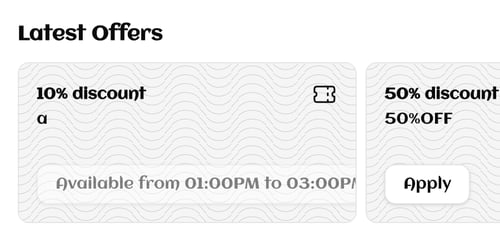
Set up a discount code customers type at checkout. It can take off a percentage, a fixed amount, or the delivery fee. Owners and managers can do this.
Before you start
Decide three things: what the code is, what it takes off, and how long it runs. Most of these cannot be changed after you save.
Steps
-
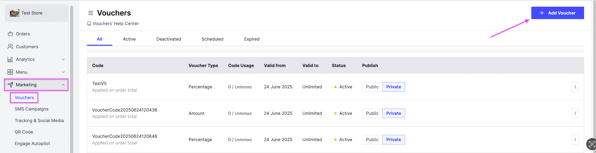
Go to Marketing and select Vouchers.
-
Click Add Voucher.
-
Fill in the voucher details, described below.
-
Click Save.
-
Choose who can see the voucher:
- Public — shown to every customer on your website.
- Private — hidden; only customers who know the code can use it.

The voucher details
Voucher code
The code customers type. It must be unique, letters and numbers only, no spaces and no symbols.
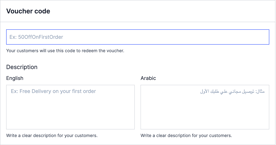
Description
Write it in English and in Arabic.
What the discount applies to
-
All products — the discount comes off the order total.
-
Specific products — pick the products, then choose how it applies: once if any of them is in the cart, or on every one of them.
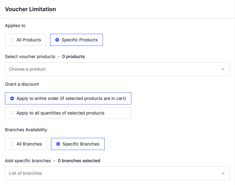
Branches
Either all branches, or only the branches you pick.
Type and value
-
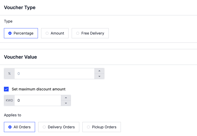
Percentage — takes a percentage off. You can also set a maximum discount amount.
-
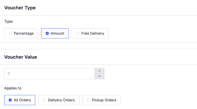
Amount — takes a fixed amount off the order total.
-
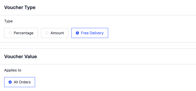
Free delivery — removes the delivery fee at checkout.
Minimum order
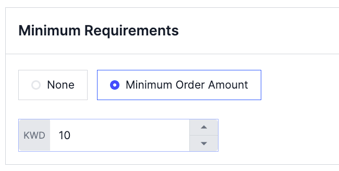
Either none, or a minimum order value the customer must reach.
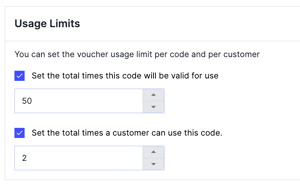
Usage limits
Set how many times the code can be used in total, and how many times one customer can use it.
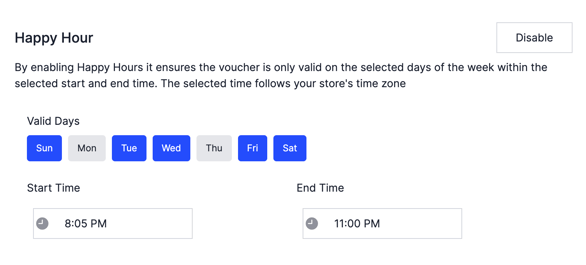
Happy hour, optional
Make the voucher work only on chosen days, between a start and an end time.
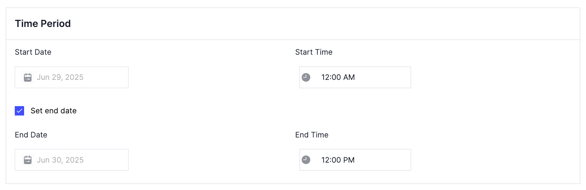
Time period
Set the start date and time. You can also set an end date, and the voucher switches itself off then.
After the voucher exists
Click the options icon next to any voucher to view, edit or deactivate it.
Only these can be changed later: description, maximum discount amount, minimum order amount, usage limits, happy hour, and the time period. The code, the type and the products it applies to are fixed once saved.
You can delete a voucher only if no customer has ever used it. Once it has been used, you can deactivate it or edit the settings above, but you cannot delete it.
Want free delivery offered as a percentage or fixed amount voucher instead? Contact support and they will set it up for you.