See details of the customers who ordered from your website, grouped into segments by how they order. Owners and managers can do this.
Steps
-
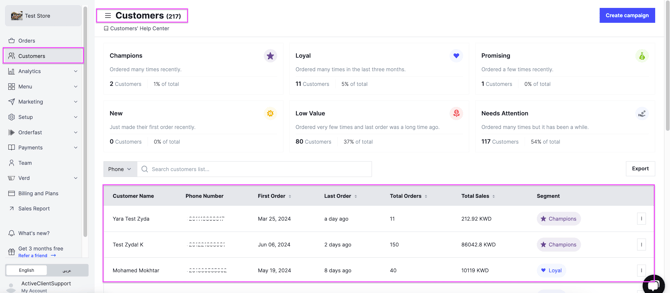
Go to Customers. You see every segment, with filters and a short description of each one.
-
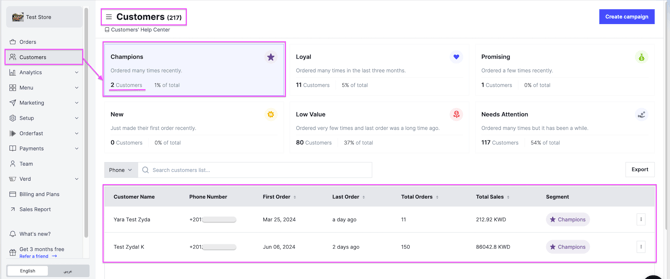
Select a segment. Every customer in that segment appears.
-
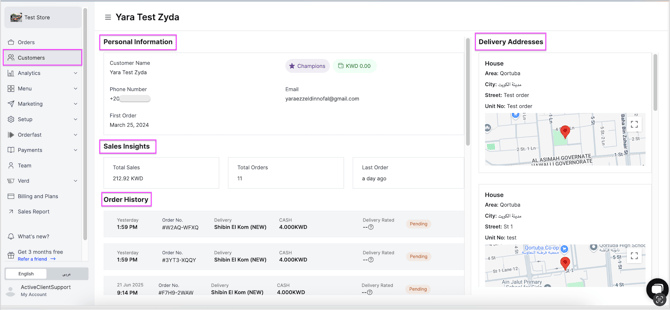
Click any customer to see their full details: personal information, sales insights, order history and delivery addresses.
-
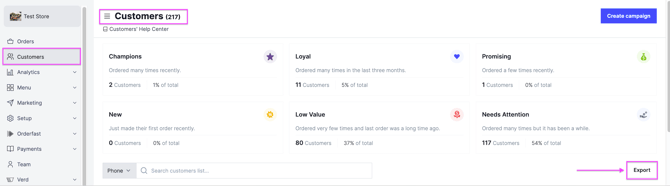
Click Export on the right of the dashboard. The report is sent to your registered email.
The segments
- Champions — ordered 3 or more times in the last week.
- Loyal — ordered 3 or more times in the last 3 months (8 to 90 days).
- Promising — up to 3 orders in the last 3 months (31 to 90 days).
- New — 1 or 2 orders in the last month.
- Low Value — 0 or 1 order, and the last order was over 3 months ago.
- Needs Attention — 2 or more orders, but none in the last 3 months.